Ticket Falcon Takes Flight with Streamlined Event Creation
 By TF Blog
June 12, 2025
3 min read
By TF Blog
June 12, 2025
3 min read

We are excited to announce a significant update to Ticket Falcon that will make creating and managing your events easier and more intuitive than ever. We listened to your feedback and are thrilled to introduce a brand-new, tabbed interface for our “Create Event” and “Edit Event” pages.
Say Goodbye to the Scroll, Hello to Seamless Navigation
Previously, our event creation and editing process involved navigating a single page with numerous options. While comprehensive, we recognized that this could sometimes feel overwhelming. To enhance your experience and streamline your workflow, we completely revamped this vital element of Ticket Falcon.
Introducing the New Tabbed Interface:
We used intuitive tabs to break down the event creation and editing process into a clear, step-by-step format. This new design allows you to focus on specific aspects of your event setup without feeling lost in a sea of options.
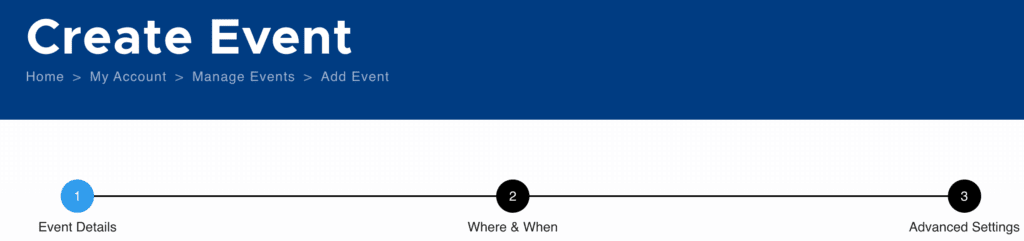
As you can see from the screenshot, the new interface segments the event setup into logical categories:
- Event Details: This first tab covers the fundamental information about your event, such as the event name, description, and category.
- Where & When: Here, you will specify the location, date, and time details for your event.
- Advanced Settings: This final tab allows you to configure more advanced options and customize your event further.
Creating an Event: A Guided Journey
The tabbed interface provides a clear and guided journey for those setting up a new event. You will progress sequentially through each tab, ensuring all essential information is captured before moving on. All required fields within a tab must be completed before you can advance to the next. This ensures you do not miss any vital details and that your event listing is complete and accurate.

Once you have filled in all the necessary information across the tabs, the final tab will present you with the “Save & Create Tickets” button. This button allows you to finalize your event details and move directly into setting up your ticket options.
Editing an Event: Flexibility at Your Fingertips
We understand that event details can sometimes change, and you need the flexibility to make updates quickly and efficiently. With the new tabbed interface, editing your existing events is more streamlined than ever.
As long as all the required fields for your event have been filled out at some point, you can now select any tab to edit the specific information you need to update. Whether it’s changing the venue, adjusting the event time, or modifying advanced settings, you can jump directly to the relevant section without having to scroll through the entire event setup. You can also easily switch between tabs to review or modify different aspects of your event before saving.
(Imagine inserting a screenshot here showing the “Previous,” “Next,” and “Save & Create Tickets” buttons on a middle tab or the last tab during editing)
Once you’ve made your desired changes, simply click “Save & Create Tickets” to apply the updates.
We’re Committed to Making Your Experience Better
This enhancement is just one of the many ways we’re working to improve your experience with Ticket Falcon. We believe this new tabbed interface will make event creation and editing more efficient, less error-prone, and ultimately, more enjoyable.
Ready to experience the difference? Log in to your Ticket Falcon account today and start creating or editing your events with our new streamlined interface! We’re confident you’ll love the improved workflow.

Ticket Falcon is an online event registration and management platform for general admission and reserved seating events, with Direct Payouts to your Stripe account. As a Stripe Verified Partner and a certified Minority Business Enterprise (MBE) through the NMSDC, we offer transparent pricing for everyone: no hidden fees, no contracts, and zero fees for free events.